This section is under construction! It is currently unfinished.
ISA implementation in gem5
Let’s take a look at how instructions are modeled!
By the end of this section, you will be able to:
- Trace the execution path of a single instruction from decoding to execution.
- Modify the ISA decoder to add a custom instruction.
- Explain at a high level how gem5 implements ISA and CPU independence using
StaticInst,DynInst, andExecContext.- Describe the instruction decoding process in the ISA parser.
ISAs in gem5
What’s an ISA?
An ISA (Iinstruction Set Architecture), is the “contract” between the hardware and the software. It governs how software (i.e., instructions) interacts with the hardware (i.e., the CPU and memory). Defined in the ISA are:
- The instructions that a processor can execute,
- The registers that are available,
- The memory model,
- Exception and interrupt handling.
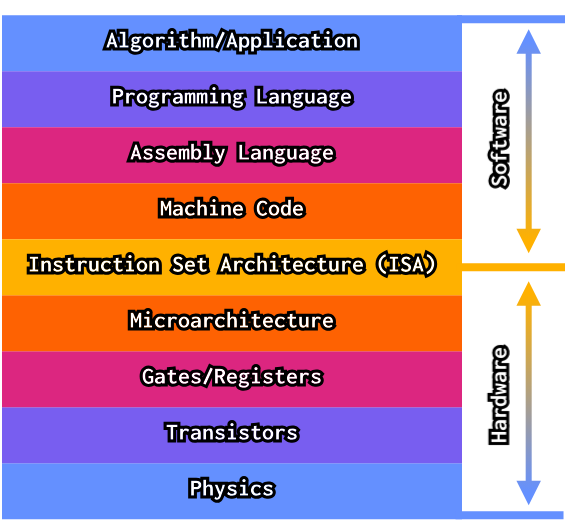
gem5 supports most major ISAs: ARM, RISC-V, x86, MIPS, and SPARC. However, MIPS and SPARC are not well-tested or maintained.
ISA-CPU independence in gem5
Normally, an ISA is inextricably tied to the physical design of the CPU (such that, for example, a specific CPU model can only implement one specific ISA). In gem5, however, this is simplified such that CPUs are decoupled from the ISA. This means that gem5’s CPU models are ISA-agnostic! In practice, this allows us to add/extend an ISA or a CPU model without massively rewriting the other.
This is implemented in gem5 through implementing a “decoder” for each ISA that converts instructions to objects describing their behavior.
Don’t confuse this “ISA decoder”, which is a gem5-specific construct to allow for ISA-CPU independence, with the decoder unit in an actual CPU. In gem5, the ISA decoder is part of the ISA definition that is “plugged into” the CPU model.
Implementing ISA-CPU independence
gem5 uses two key classes and one key interface to implement ISA-CPU independence: the StaticInst and DynInstclasses and the ExecContext interface.
StaticInst (src/cpu/static_inst.cc) contains static information about a particular ISA instruction for all instances of that instruction. It contains information on:
- The operation class (e.g., arithmetic, branch, etc.),
- Source and destination registers,
- Flags to show if the instruction has micro-ops,
- Functions defining the instruction’s behavior:
execute()(how the instruction is executed)initiateAcc()(for instructions that access memory in simulations with aTIMINGCPU model, this initiates the memory access)completeAcc()(for instructions that access memory in simulations with aTIMINGCPU model, this completes the memory access and performs any needed actions such as writing back the value)disassemble()(disassembles the instruction, which is useful for tracing and debugging)
On the other hand, DynInst (specific to the CPU model; for example, src/cpu/o3/dyn_inst.cc for O3 CPUs) contains information on a particular instance of an instruction. It is constructed from a StaticInst object, so it contains that information, along with:
- The PC (program counter) and predicted next-PC,
- The instruction result,
- The thread number,
- The CPU the instruction is executing on,
- The renamed source/destination register indices.
The DynInst class also implements the ExecContext interface. This interface provides methods for an instruction to interface with the CPU in a standardized way:
- Read/write CPU registers, including the PC,
- Read/write to other parts of memory.
This means that the CPU uses the ExecContext functions implemented in an instruction’s DynInst instance to actually execute it.
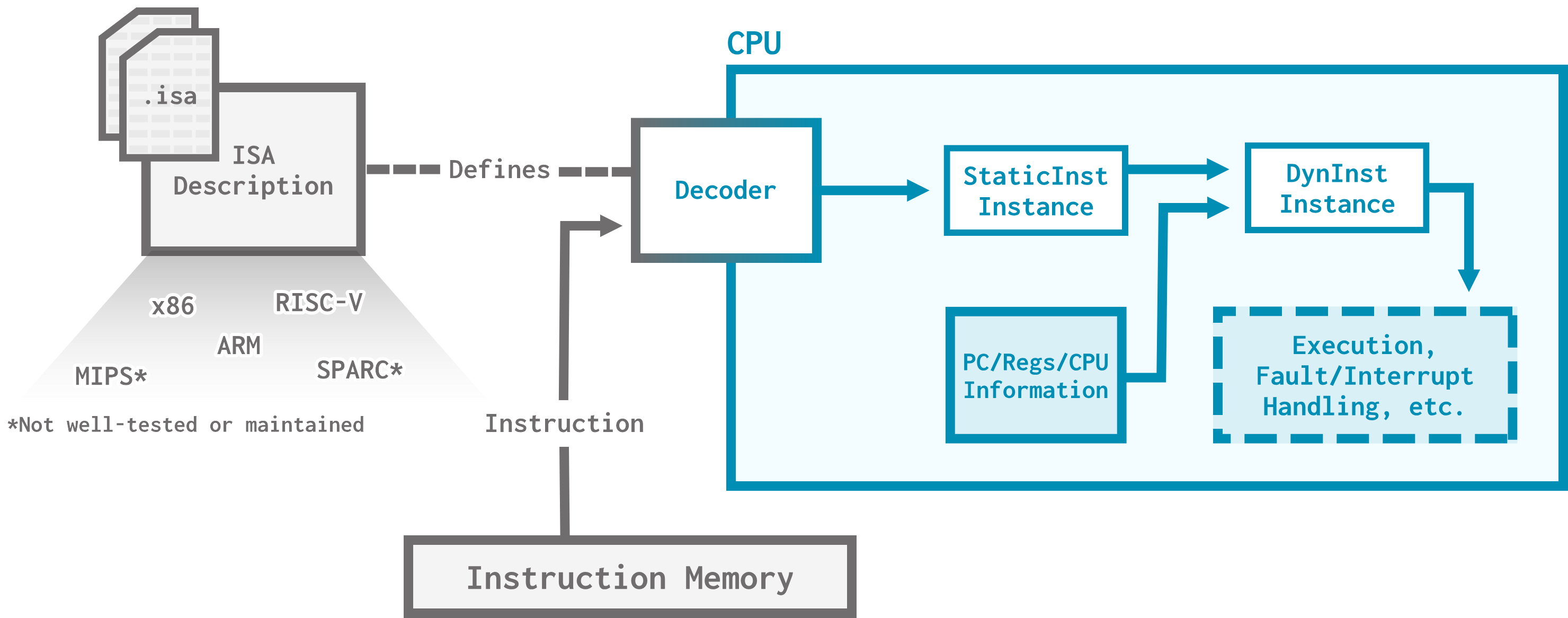
Each instruction in a specific ISA (ex: add, sub, load, etc.) has an auto-generated class generated from the ISA description (more on this in a moment).
Reading through the huge auto-generated files is not recommended.
Journey of an instruction
Now that we know the key elements of how instructions are implemented in gem5, let’s trace the execution of a simulated instruction using GDB. Open inst_trace.py to get started. This is a simple configuration script running a RISC-V “hello world” workload on a simple TIMING processor.
Let’s start by running gem5 in GDB:
gdb gem5
If you’ve been using an alias to run gem5 and GDB complains about
No such file or directory, you might want to provide the full path to the gem5 executable (i.e.,gem5/build/ALL/gem5.opt) instead of using your alias.
Make sure that you see a line like this:
Reading symbols from gem5/build/ALL/gem5.opt...
We’ll be tracing the execution of an Add instruction. To do this, we’ll place breakpoints in the Add:Add() function (the constructor of the Add class which creates the StaticInst object) and in the Add::execute() function (the function called to execute the Add instruction):
break Add::Add
break Add::execute
We are now ready to run:
run inst_trace.py
Getting to the Add constructor
After GDB chugs along for a moment, you should see:
Breakpoint 1.3, gem5::RiscvISAInst::Add::Add (this=this@entry=0xa1b78c0, machInst=machInst@entry=...)
    at build/ALL/arch/riscv/generated/decoder-ns.cc.inc:25967
This means we’ve hit the constructor for the Add instruction! You can see this is specifically for a RISC-V add, since our workload is a RISC-V workload, and that this code is in the auto-generated generated directory.
Let’s run a stack trace to see the call chain of the last 10 functions that led us to calling this constructor:
backtrace 10
You should see something that looks like this:
#0  gem5::RiscvISAInst::Add::Add (this=this@entry=0xa1b78c0, machInst=machInst@entry=...) at build/ALL/arch/riscv/generated/decoder-ns.cc.inc:25967
#1  0x00000000033e26ef in gem5::RiscvISA::Decoder::decodeInst (this=<optimized out>, machInst=...)
    at build/ALL/arch/riscv/generated/decode-method.cc.inc:3565
#2  0x000000000328caca in gem5::RiscvISA::Decoder::decode (this=0x82946e0, mach_inst=..., addr=<optimized out>) at src/arch/riscv/decoder.cc:125
#3  0x000000000328d5ad in gem5::RiscvISA::Decoder::decode (this=<optimized out>, _next_pc=...) at src/arch/riscv/decoder.cc:171
#4  0x00000000044b49df in gem5::BaseSimpleCPU::preExecute (this=this@entry=0x97d5800) at src/cpu/simple/base.cc:360
#5  0x00000000044ac3d4 in gem5::TimingSimpleCPU::completeIfetch (this=0x97d5800, pkt=0x9867970) at src/cpu/simple/timing.cc:841
#6  0x0000000005c45d15 in gem5::EventQueue::serviceOne (this=this@entry=0x82a8c60) at src/sim/eventq.cc:249
#7  0x0000000005c72b28 in gem5::doSimLoop (eventq=0x82a8c60) at src/sim/simulate.cc:339
#8  0x0000000005c7321e in gem5::simulate (num_cycles=<optimized out>) at /usr/include/c++/14/bits/stl_vector.h:1128
#9  0x0000000005bad26e in pybind11::detail::argument_loader<unsigned long>::call_impl<gem5::GlobalSimLoopExitEvent*, gem5::GlobalSimLoopExitEvent* (*&)(unsigned long), 0ul, pybind11::detail::void_type>(gem5::GlobalSimLoopExitEvent* (*&)(unsigned long), std::integer_sequence<unsigned long, 0ul>, pybind11::detail::void_type&&) && (this=0x7fffffffcb18, f=<optimized out>) at ext/pybind11/include/pybind11/detail/../cast.h:1442
(More stack frames follow...)
You can read this output from the top down: the topmost function (labeled #0, in this case Add:Add) is the most recently-called function. The function below it (labeled #1, in this case gem5::RiscvISA::Decoder::decodeInst) is its caller, and so on.
We can see that the function labeled
#8is thesimulate()function!
The 5th function (gem5::TimingSimpleCPU::completeIfetch) is the function responsible for completing an instruction fetch (in this case, the fetch of the Add instruction). The 4th function (gem5::BaseSimpleCPU::preExecute) does all of the necessary setup for executing an instruction.
We can see this function in
src/cpu/simple/base.cc, snipped below if you’re curious:
preExecute()void BaseSimpleCPU::preExecute() { SimpleExecContext &t_info = *threadInfo[curThread]; SimpleThread* thread = t_info.thread; // resets predicates t_info.setPredicate(true); t_info.setMemAccPredicate(true); // decode the instruction set(preExecuteTempPC, thread->pcState()); auto &pc_state = *preExecuteTempPC; auto &decoder = thread->decoder; if (isRomMicroPC(pc_state.microPC())) { t_info.stayAtPC = false; curStaticInst = decoder->fetchRomMicroop( pc_state.microPC(), curMacroStaticInst); } else if (!curMacroStaticInst) { //We're not in the middle of a macro instruction StaticInstPtr instPtr = NULL; //Predecode, ie bundle up an ExtMachInst //If more fetch data is needed, pass it in. Addr fetch_pc = (pc_state.instAddr() & decoder->pcMask()) + t_info.fetchOffset; decoder->moreBytes(pc_state, fetch_pc); //Decode an instruction if one is ready. Otherwise, we'll have to //fetch beyond the MachInst at the current pc. instPtr = decoder->decode(pc_state); // WE ARE HERE!!! if (instPtr) { t_info.stayAtPC = false; thread->pcState(pc_state); } else { t_info.stayAtPC = true; t_info.fetchOffset += decoder->moreBytesSize(); } //If we decoded an instruction and it's microcoded, start pulling //out micro ops if (instPtr && instPtr->isMacroop()) { curMacroStaticInst = instPtr; curStaticInst = curMacroStaticInst->fetchMicroop(pc_state.microPC()); } else { curStaticInst = instPtr; } } else { //Read the next micro op from the macro op curStaticInst = curMacroStaticInst->fetchMicroop(pc_state.microPC()); } //If we decoded an instruction this "tick", record information about it. if (curStaticInst) { #if TRACING_ON traceData = tracer->getInstRecord(curTick(), thread->getTC(), curStaticInst, thread->pcState(), curMacroStaticInst); #endif // TRACING_ON } if (branchPred && curStaticInst && curStaticInst->isControl()) { // Use a fake sequence number since we only have one // instruction in flight at the same time. const InstSeqNum cur_sn(0); set(t_info.predPC, thread->pcState()); const bool predict_taken( branchPred->predict(curStaticInst, cur_sn, *t_info.predPC, curThread)); if (predict_taken) ++t_info.execContextStats.numPredictedBranches; } // increment the fetch instruction stat counters if (curStaticInst) { countFetchInst(); } }
The line of interest to us (the one that calls the next function in the trace) is this one:
instPtr = decoder->decode(pc_state);
The next function up (gem5::RiscvISA::Decoder::decode) is the RISC-V ISA’s decoder. This function loads in the instruction into the decoder before calling another decode() function (with different arguments) to decode the loaded instruction.
We can find it in
gem5/src/arc/riscv/decoder.cc:
decode()StaticInstPtr Decoder::decode(PCStateBase &_next_pc) { if (!instDone) return nullptr; instDone = false; auto &next_pc = _next_pc.as<PCState>(); if (GEM5_UNLIKELY(next_pc.zcmtSecondFetch())) { return new ZcmtSecondFetchInst(emi, jvtEntry); } if (compressed(emi)) { next_pc.npc(next_pc.instAddr() + sizeof(machInst) / 2); next_pc.compressed(true); } else { next_pc.npc(next_pc.instAddr() + sizeof(machInst)); next_pc.compressed(false); } if (GEM5_UNLIKELY(squashed || next_pc.new_vconf())) { squashed = false; next_pc.new_vconf(false); vl = next_pc.vl(); vtype = next_pc.vtype(); } else { next_pc.vl(vl); next_pc.vtype(vtype); } emi.vl = vl; emi.vtype8 = vtype & 0xff; emi.vill = vtype.vill; emi.rv_type = static_cast<int>(next_pc.rvType()); emi.enable_zcd = _enableZcd; return decode(emi, next_pc.instAddr()); // WE ARE HERE }
The line of interest to us is this one:
return decode(emi, next_pc.instAddr());
The next function is also called decode(), but this one is a simple wrapper around the auto-generated decodeInst() function that decodes the instruction into a StaticInst instance and sets some of its fields. Let’s look at this one in full:
StaticInstPtr
Decoder::decode(ExtMachInst mach_inst, Addr addr)
{
    DPRINTF(Decode, "Decoding instruction 0x%08x at address %#x\n",
            mach_inst.instBits, addr);

    StaticInstPtr &si = instMap[mach_inst];
    if (!si)
        si = decodeInst(mach_inst);

    si->size(compressed(mach_inst) ? 2 : 4);

    DPRINTF(Decode, "Decode: Decoded %s instruction: %#x\n",
            si->getName(), mach_inst);
    return si;
}
Spot the call to decodeInst(mach_inst), which returns a StaticInst pointer!
Reading the auto-generated code (located in src/build/ALL/arch/riscv/generated/decoder-ns.cc.inc) is a bit tricky. Here is a snippet that has been edited to remove superfluous lines to show the path of the Add instruction:
case 0xc:
    switch (FUNCT3) {
    case 0x0:
        switch (KFUNCT5) {
        case 0x0:
            switch (BS) {
            case 0x0:
                // ROp::add(['\n   Rd = rvSext(Rs1_sd + Rs2_sd);\n   '],{})
                    return new Add(machInst);
                break;
As you may gather, this is basically just a giant map of instruction bytes to instructions, implemented as a giant nested switch statement. Not a pleasant reading experience, but it yields the correct object (a new Add instance) in the end!
The execute() function
Let’s leave this constructor behind and continue executing until we hit our next breakpoint in the execute() function:
continue
You should see the following indicating you’ve reached the correct breakpoint:
Breakpoint 2.3, gem5::RiscvISAInst::Add::execute (this=0xa1b78c0, xc=0x9aea6c0, traceData=0x0) at build/ALL/arch/riscv/generated/exec-ns.cc.inc:40188
Let’s do another backtrace, this time for 5 functions:
backtrace 5
You should see the following:
#0  gem5::RiscvISAInst::Add::execute (this=0xa1b78c0, xc=0x9aea6c0, traceData=0x0) at build/ALL/arch/riscv/generated/exec-ns.cc.inc:40188
#1  0x00000000044ac52c in gem5::TimingSimpleCPU::completeIfetch (this=0x97d5800, pkt=0x9867970) at src/cpu/simple/timing.cc:876
#2  0x0000000005c45d15 in gem5::EventQueue::serviceOne (this=this@entry=0x82a8c60) at src/sim/eventq.cc:249
#3  0x0000000005c72b28 in gem5::doSimLoop (eventq=0x82a8c60) at src/sim/simulate.cc:339
#4  0x0000000005c7321e in gem5::simulate (num_cycles=<optimized out>) at /usr/include/c++/14/bits/stl_vector.h:1128
As you can see, the caller of Add::execute() is gem5::TimingSimpleCPU::completeIfetch(), specifically in the following line:
Fault fault = curStaticInst->execute(&t_info, traceData);
We call
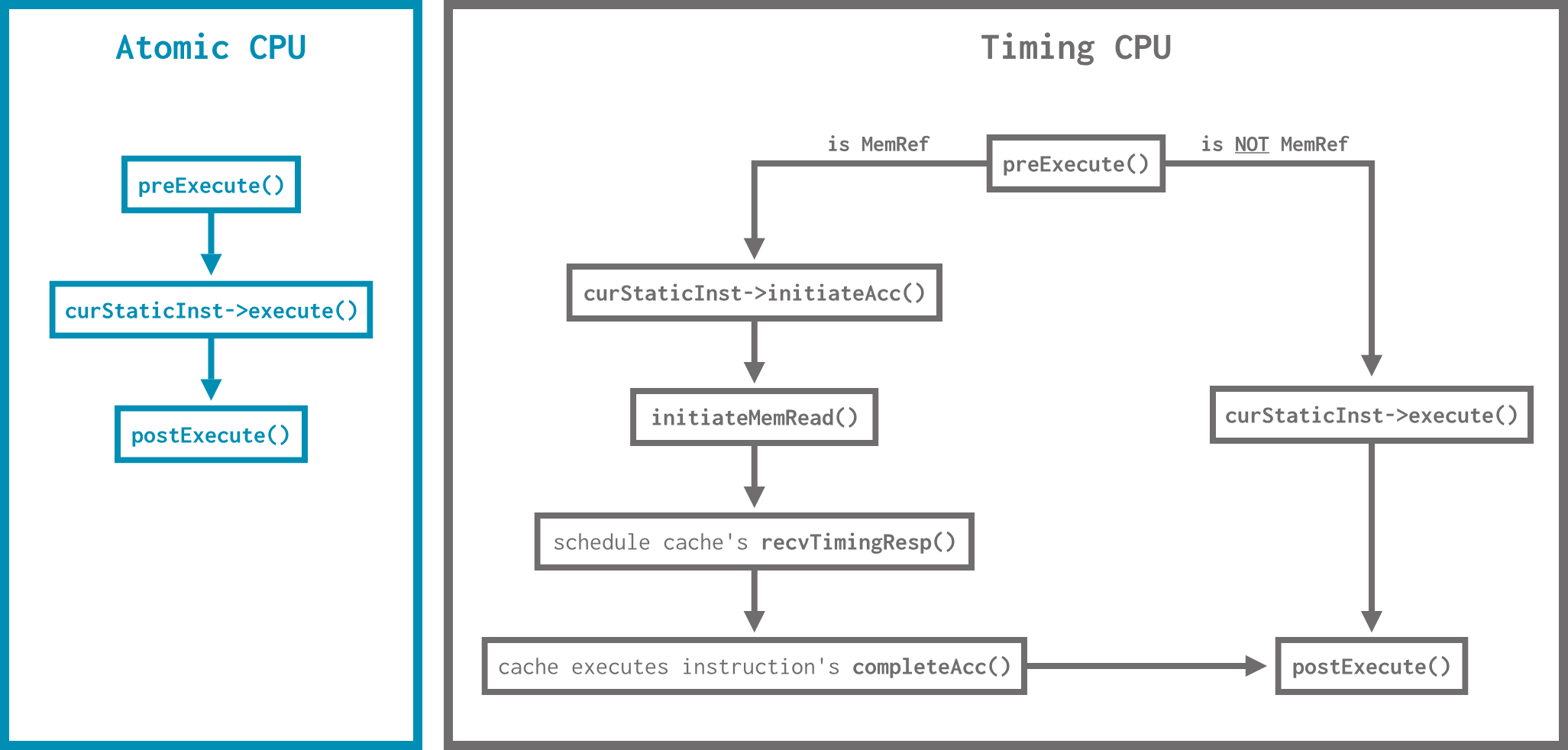
execute()directly incompleteIfetch()becauseAddis not a memory instruction. Non-memory instructions (and memory instructions inATOMICCPUs) are simulated as if they are instantaneous; memory instructions in aTIMINGCPU are executed in two parts usinginitiateAcc()andcompleteAcc(), which simulate timing.
In CPU models that are not
SimpleCPU, this looks a bit different (and more complex).
We’re done with this trace now. Let’s quit GDB:
quit
Since a program is still running, you’ll to confirm you want to quit by typing
yafter executing thequitcommand.
The gem5 ISA parser
Now that we’ve seen how an instruction is decoded and executed, it’s time to look into the most complicated part of gem5 ISAs: ISA specifications and parsing.
ISA definitions
The definition for each ISA is found under gem5/src/arch/<ISA_NAME>/isa (for example gem5/src/arch/riscv/isa for RISC-V). ISA definitions are written in a domain-specific language (DSL) we refer to as the ISA Domain Specific Language (ISA DSL).
There are a lot of files in the
isadirectory, and you don’t need to be an expert on all of them; it’s unlikely you’ll need to define an ISA from scratch.Most gem5 developers who modify ISAs tend to model their work off of existing instructions without understanding how every piece of code is auto-generated.
When gem5 is built, the build system parses the files in the isa directory using the gem5/src/arch/isa/isa_parser/isa_parser.py script. This script generates all of the necessary C++ code to define the ISA, which is then compiled into the gem5 binary. As we saw when we peeked into exec-ns.cc.inc above, you can find all of the generated ISA files in the gem5/build/ALL/arch/<ISA_NAME>/generated directory.
The implementation of an instruction
Let’s look at the RISC-V LW (load word) instruction to see how it is specified, decoded, and executed in gem5.
RISC-V 32-bit instructions
In case you haven’t seen them before, RISC-V instructions are 32 bits long and have six base types: R, I, S, B, U, and J.
- R type: for register-register operations.
- I type: for immediate and load operations.
- S type: for store operations.
- B type: for branch operations.
- U type: for upper immediate operations.
- J type: for jump operations.
This means that
LW, which loads a word from memory, is an I-type instruction.
These types follow four different formats:

This means that
LW, as an I-type instruction, follows the second format: immediate (31-20), rs1 (19-15), func (14-12), rd (11-7), opcode (6-0).