Event-driven simulation
Let’s take a look at how gem5 simulates SimObjects and how SimObjects interact with one another.
By the end of this section, you will be able to:
- Explain at a high level how gem5’s event-driven simulation is implemented as a series of events and callbacks.
- Describe how gem5 uses SimObject parameters to allow for event-driven simulation.
Events
gem5 is an event-driven simulator. This means that events are the core of how gem5 simulates behavior.
Event-driven simulation refresher
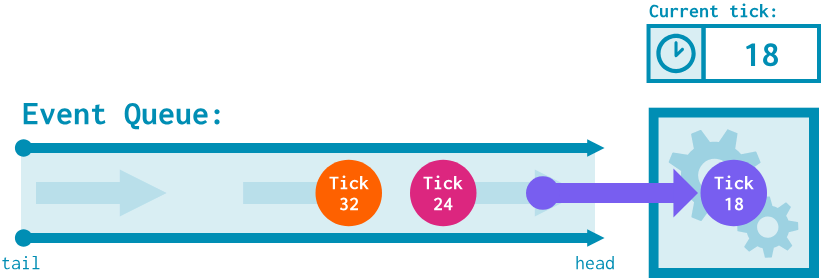
As a reminder, gem5 performs discrete event simulation. This means that it maintains an event queue:
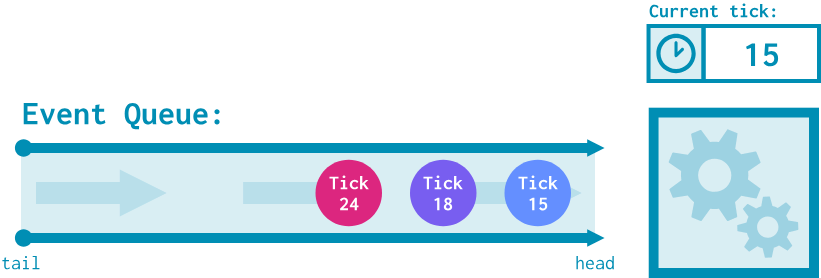
At each time tick, the event(s) at the top of the queue are dequeued and executed.
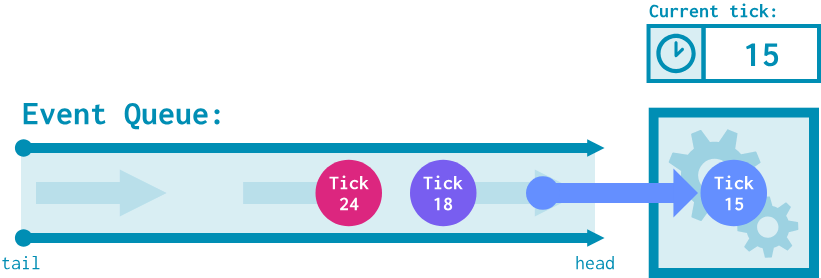
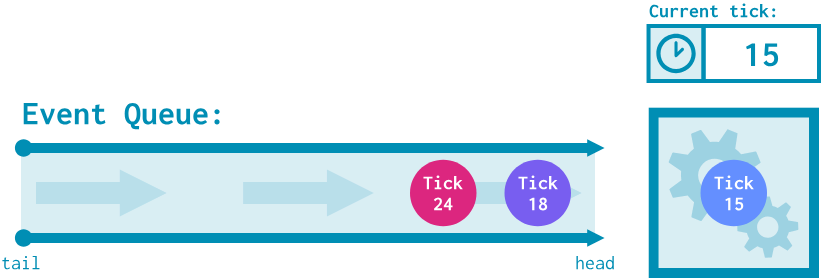
This might lead to the scheduling of new events at a future time tick. All SimObjects can enqueue events onto the event queue.
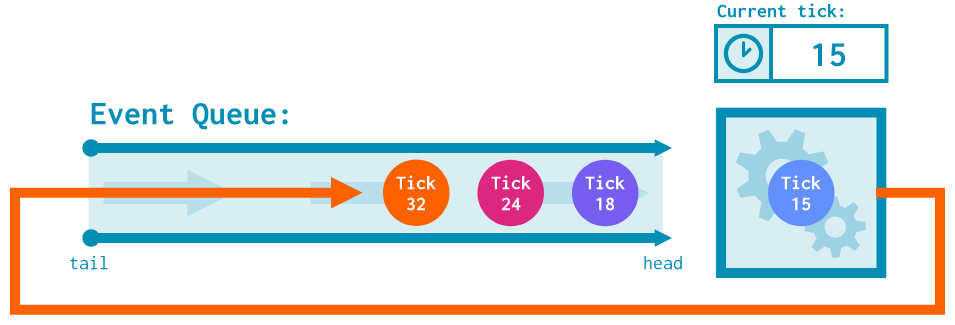
This process continues until there are no more events to simulate!
As a reminder, a gem5 tick is typically equivalent to 1 ps, meaning there are $10^{12}$ ticks in a simulated second.
It is important to point out the difference between scheduling an event and calling a function. While a scheduled event will occur in the future after some specified amount of simulation ticks, a function call will execute on the same tick. This means that we can think about a gem5 simulation as a series of scheduled events and function calls, with scheduled events advancing simulation time and function calls handling behavior within a tick.
Events in gem5
Events in gem5 are implemented using the Event class, the declaration of which can be found in gem5/src/sim/eventq.hh. This file has a lot of event-related classes and declarations; for now, let’s focus on the most important public method of the Event class:
 /*
     * This member function is invoked when the event is processed
     * (occurs).  There is no default implementation; each subclass
     * must provide its own implementation.  The event is not
     * automatically deleted after it is processed (to allow for
     * statically allocated event objects).
     *
     * If the AutoDestroy flag is set, the object is deleted once it
     * is processed.
     *
     * @ingroup api_eventq
     */
    virtual void process() = 0;
process() is the Event’s callback function: the function that executes on the tick the event was scheduled for. The behavior of this function determines what effects this event will have on the system. In order to define a new kind of event within gem5, we create a new class for it that inherits from Event and overrides the process() method.
Events can be scheduled from anywhere using the schedule() function:
void schedule(Event event, Tick when)
This function enqueues the provided event into the simulator’s event queue, to be dequeued on tick when. When it is eventually dequeued, its process() function will be called.
m5.simulate() and startup methods
So far, we know that:
1) Events are implemented by extending the Event class and overriding process(), 2) We can schedule events by calling schedule().
…but where is the first event scheduled? How does simulation get off the ground? To figure this out, we can look at m5.simulate (found in gem5/src/python/m5.simulate.py).
As you may remember from the previous section, this function is called to start simulation after calling m5.instantiate; we can think of this as setting up tick 0 of simulation after m5.instantiate instantiates the device tree. Within m5.simulate(), we can see the following lines:
def simulate(*args, **kwargs):
    # ...
    if need_startup:
        root = objects.Root.getInstance()
        for obj in root.descendants():
            obj.startup()
        need_startup = False
This loop calls a function called startup() for every single SimObject in the device tree. We can check the documentation for startup() in the SimObject class:
/**
     * startup() is the final initialization call before simulation.
     * All state is initialized (including unserialized state, if any,
     * such as the curTick() value), so this is the appropriate place to
     * schedule initial event(s) for objects that need them.
    */
    virtual void startup();
This means all “initial” events in the system originate from their SimObjects’ startup() functions, which are called in m5.simulate().
Implementing HelloEvent
Let’s follow the event creation process by adding an event to our HelloSimObject from the previous section. Our goal will be to print our Hello, world! message every 500 ticks num_hellos times; for example, if num_hellos is 4, we should print a message at tick 500, 1000, 1500, and 2000.
hello_sim_object.hh
Since we’ll be modifying a SimObject’s interface, we’ll need to modify hello_sim_object.hh. First, we should import eventq.hh so that we can use the Event class:
#include "sim/eventq.hh"
Remember to order your imports according to style guidelines!
This might feel a bit out of order, but let’s declare the callback function now. Remember, this is what we want an instance of the event to do when it is processed. We’ll define this as a public function under HelloSimObject:
public:
    ...
    void processHello();
We’ll implement this function in the source file in a moment.
We now need to create a new class that extends Event to model our desired event behavior. We can call it HelloEvent. We’ll define this event as a private inner class within HelloSimObject, then also create a private field in HelloSimObject that’s an instance of the class:
private:
    // the class
    class HelloEvent : public Event
    {
        // we'll put things here in a moment!
    };

    // the instance
    HelloEvent nextHelloEvent;
HelloEvent needs some form of reference to its “owner”: the SimObject that this event operates on. We know this will be an instance of HelloSimObject, so let’s define it as a private field in HelloEvent like this:
private:
    // the class
    class HelloEvent : public Event
    {
        private:
            HelloSimObject* owner;
    };
    ...
Next, let’s write the constructor. All the constructor needs to do is call Event’s constructor and set up the owner field:
    // the class
    class HelloEvent : public Event
    {
        private:
            HelloSimObject* owner;
        public:
            HelloEvent(HelloSimObject* owner):
            Event(),
            owner(owner)
            {}
    };
    ...
In order to fully implement an Event subclass, we must override the process() method. Since this is the implementation of the callback function within Event, we can just call our owner’s processHello() function:
    // the class
    class HelloEvent : public Event
    {
        private:
            HelloSimObject* owner;
        public:
            HelloEvent(HelloSimObject* owner):
            Event(),
            owner(owner)
            {}

            virtual void process() override
            {
                owner->processHello();
            }
    };
    ...
To schedule the first HelloEvent, we need to implement startup() for HelloSimObject. Let’s declare it here:
public:
    ...
    void processHello();
    virtual void startup() override;
In summary, we made the following changes to
hello_sim_object.hh:1) Created the public
processHelloEvent()method, a method that will implement the callback behavior forHelloEvent, 2) Defined theHelloEventprivate inner class, which inherits fromEvent.HelloEventhas aHelloSimObjectowner and overridesEvent’sprocess()function to call its owner’sprocessHelloEvent(). 3) Defined the override forstartup()inHelloSimObject, which we’ll need to schedule the firstHelloEvent.
hello_sim_object.cc
Let’s now turn our attention to hello_sim_object.cc. The first thing we should do is augment HelloSimObject’s constructor to initialize its HelloEvent instance, which we do by adding nextHelloEvent to the initialization list:
HelloSimObject::HelloSimObject(const HelloSimObjectParams& params):
    SimObject(params), nextHelloEvent(this)
{
    ...
}
We need to implement the startup() method to schedule the first HelloEvent. For safety, we can include a few panic statements.
We’ll talk more about panics in the debugging section! For now, all you need to know is that they break out of simulation if a condition is met.
Since m5.simulate() is only called once at simulation tick 0, we can double-check that the current tick is 0 and that no HelloEvents are somehow scheduled. We can then schedule() nextHelloEvent for simulation tick 500.
void
HelloSimObject::startup()
{
    panic_if(curTick() != 0, "startup called at a tick other than 0");
    panic_if(nextHelloEvent.scheduled(), "nextHelloEvent is scheduled before HelloSimObject::startup is called!");

    schedule(nextHelloEvent, 500);
}
Note the use of the
curTick()function: as the name suggests, this function returns the value of the current tick.
Finally, let’s actually implement what this HelloEvent does when it’s processed. As a reminder, we want to print a hello message, then schedule the next event 500 ticks from now, repeating this process a total of num_hellos times.
This means we need a way to keep track of how many hello messages we still need to print. We’ll do this with a private field called remainingHellos, initializing it to the value of num_hellos and decrementing it every time we print a message.
We’ll make one small detour to hello_sim_object.hh to declare it:
private:
    class HelloEvent : public Event
    {
        ...
    };
    HelloEvent nextHelloEvent;
    int remainingHellos; // add this line!
…and we’ll initialize it in the initialization list of the constructor in hello_sim_object.cc:
HelloSimObject::HelloSimObject(const HelloSimObjectParams& params):
    SimObject(params),
    nextHelloEvent(this),
    remainingHellos(params.num_hellos) // add this!
{
    ...
}
We’re now ready to implement processHello(), the method that HelloEvent calls in its process() function.
void
HelloSimObject::processHello()
{
    // Print a hello message that includes the current tick
    std::cout << "tick: " << curTick() << ", Hello from HelloSimObject::processHello!" << std::endl;

    // Decrement hellos remaining
    remainingHellos--;

    // Schedule the next event if we still have hellos to print
    if (remainingHellos > 0) {
        schedule(nextHelloEvent, curTick() + 500);
    }
}
We are (finally) done implementing this event! As a reminder, here’s everything we did:
1) Created a private inner class HelloEvent that extends the Event class inside of HelloSimObject, - This class takes a reference to an owner instance of HelloSimObject and overrides Event’s process() method with its owner’s processHello() method. 2) Created an instance of HelloEvent called nextHelloEvent in HelloSimObject. 3) Overrode startup() in HelloSimObject to schedule nextHelloEvent at tick 500, 4) Implemented processHello() to print out a hello message and schedule nextHelloEvent 500 ticks in the future if we still have more messages to print.
Let’s run this thing!
It’s time to rebuild gem5 and see our new behavior in action. Just like in the previous section, we rebuild gem5 with the following:
scons build/ALL/gem5.opt -j$(nproc)
Once that’s done, we’ll rerun the same configuration script from the previous section:
gem5 hello_sim_object_config.py
When you do, you should see the following:
i: 0, Hello from HelloSimObject's constructor!
i: 1, Hello from HelloSimObject's constructor!
i: 2, Hello from HelloSimObject's constructor!
i: 3, Hello from HelloSimObject's constructor!
tick: 500, Hello from HelloSimObject::processHello!
tick: 1000, Hello from HelloSimObject::processHello!
tick: 1500, Hello from HelloSimObject::processHello!
tick: 2000, Hello from HelloSimObject::processHello!
Exited simulation because: simulate() limit reached.
We still have the constructor’s hellos, but now we can also see hello messages from ticks 500, 1000, 1500, and 2000, just like we wanted.
EventFunctionWrapper
You may have noticed that we needed to write an entire HelloEvent class just to set up fairly simple callback function behavior. Good news! The EventFunctionWrapper class exists to simplify this process and eliminate the need for writing a new class. As the name suggests, EventFunctionWrapper takes a callback function and wraps it into an Event class.
Let’s see this process by using EventFunctionWrapper for HelloSimObject.
hello_sim_object.hh
The biggest change we need to make is to delete the HelloEvent class entirely:
private:
    HelloEvent nextHelloEvent;
    int remainingHellos;
Since HelloEvent no longer exists, we replace it with EventFunctionWrapper:
private:
    EventFunctionWrapper nextHelloEvent;
    int remainingHellos;
…and that’s it! Let’s update hello_sim_object.cc with the implementation.
hello_sim_object.hh
The only change we need to make here is to the initialization list. While HelloEvent’s constructor only took a reference to its owner (in our case, this), EventFunctionWrapper’s constructor requires two parameters:
- The callback function, which in our case will be
processHello(), - A name, to better tell it apart from other
EventFunctionWrapperbeing used in the simulation. We’ll appropriately name our event with the name of the SimObject(HelloSimObject) and the name of the event (HelloEvent).
Modify the constructor of HelloSimObject to the following:
HelloSimObject::HelloSimObject(const HelloSimObjectParams& params):
    SimObject(params),
    // new stuff here!
    nextHelloEvent([this](){ processHello(); },
                   name() + "HelloEvent"),
    //
    remainingHellos(params.num_hellos)
{
    ...
}
With these minimal changes, we’re ready to go. EventFunctionWrapper gets rid of a lot of the boilerplate code required to get an event off the ground, leaving us with the work of defining the event behavior.
Let’s run this thing!
Once again, we need to rebuild gem5:
scons build/ALL/gem5.opt -j$(nproc)
…and rerun the same configuration script:
gem5 hello_sim_object_config.py
You should see the same output from before:
i: 0, Hello from HelloSimObject's constructor!
i: 1, Hello from HelloSimObject's constructor!
i: 2, Hello from HelloSimObject's constructor!
i: 3, Hello from HelloSimObject's constructor!
tick: 500, Hello from HelloSimObject::processHello!
tick: 1000, Hello from HelloSimObject::processHello!
tick: 1500, Hello from HelloSimObject::processHello!
tick: 2000, Hello from HelloSimObject::processHello!
Exited simulation because: simulate() limit reached.
In summary, we have two options when creating events in gem5: extending the Event class ourselves or letting EventFunctionWrapper do it for us. The overall structure of the implementation looks the same, but EventFunctionWrapper allows the code to be a bit more compact.
Preview: SimObjects as parameters
Last section, we looked at how to pass simple parameters (for example, an integer num_hellos) to our SimObjects. It’s also possible to add a whole SimObject as a parameter to another! This allows us to connect related SimObjects to one another. These SimObjects can then call functions or trigger events for one another.
Branch predictors
Let’s take a look at an example of a SimObject taking a SimObject parameter: CPU SimObjects (which, as a reminder, represent cores) take a branch predictor SimObject as a parameter. For example, here’s the declaration file of BaseSimpleCPU (found in gem5/src/cpu/simple/BaseSimpleCPU.py):
class BaseSimpleCPU(BaseCPU):
    type = "BaseSimpleCPU"
    abstract = True
    cxx_header = "cpu/simple/base.hh"
    cxx_class = "gem5::BaseSimpleCPU"

    branchPred = Param.BranchPredictor(NULL, "Branch Predictor")
The BaseSimpleCPU class (which all the ISA-specific SimpleCPUs inherit from) takes the branchPred parameter, which can either be null (no branch prediction) or an instance of the BranchPredictor class. This branch predictor is then saved as a class field when BaseSimpleCPU is instantiated (see gem5/src/cpu/simple/base.cc):
BaseSimpleCPU::BaseSimpleCPU(const BaseSimpleCPUParams &p)
    : BaseCPU(p),
      curThread(0),
      branchPred(p.branchPred), // right here!
      traceData(NULL),
      _status(Idle)
{
  ...
}
…and the branchPred field is used for branch prediction behavior within the code, if it exists (see gem5/src/cpu/simple/bse.cc):
// if we have a branch predictor and are executing a branch instruction, do some prediction!
if (branchPred && curStaticInst &&
        curStaticInst->isControl()) {
        ...
        const bool predict_taken(
            branchPred->predict(curStaticInst, cur_sn, *t_info.predPC,
                curThread));
        ...
    }
Here, the CPU SimObject is simply calling a public member function of the branch predictor SimObject, not scheduling an event.
Factoring out branch predictors into their own SimObjects with a common BranchPredictor interface allows gem5 CPUs to be modular: we can easily replace the branch predictor (or have no predictor at all) to compare behavior.
You’ll be writing your own branch predictor in this unit!