Memory in gem5
Rounding out our tour of the big three gem5 subsystems, we have memory.
By the end of this section, you will be able to:
- Explain what memory controllers and memory interfaces do in gem5.
- Modify a memory system by instantiating an instance of ChanneledMemory with custom parameters.
- Compare the performance of the SimpleMemory and ChanneledMemory standard library components.
Memory primer (AKA what do the letters mean?)
Much like the caches unit, this unit assumes knowledge of some memory details that you may not have encountered before. If you feel good about your knowledge of DRAM/HBM/NVM, please continue to the next header (“Memory controllers and interfaces”)! Otherwise, keep reading.
Collapse this header to hide the memory explanation!
So what’s DRAM?
Most modern computers use DRAM as their main memory interface, including the device you’re using right now! DRAM differs from disk and other permanent storage devices in its volatility: unlike these storage devices, DRAM requires power to keep its data. In exchange, it has much lower latency.
DRAM stands for Dynamic Random-Access Memory. It’s dynamic because it stores its data in capacitors, which gradually lose their charge and need to be refreshed. It’s random access because its data can be read or written in any order (unlike something like a hard disk, which may take longer to fetch some data depending on whether the access pattern is sequential or not). It’s memory because it stores the program’s data!
DRAM terminology
You may have heard DRAM referred to in terms of “sticks”. Those are DIMMs! A DIMM (Dual Inline Memory Module) is a circuit board containing DRAM devices. A group of DRAM devices that operate in unison make up a rank, which a DIMM can have multiple of. Within a single rank, there are one or more banks, which are smaller units that operate independently. Within each bank are one or more arrays, which are (finally) what store the individual bits of data.
To recap, we have:
- DIMM: A stick of DRAM.
- Rank: A group of DRAM devices on a DIMM. A DIMM can have one or more ranks.
- Bank: A smaller unit of memory storage within a rank. A rank can have multiple banks.
- Array: Where the bits of memory are stored within a bank. A bank can have multiple arrays.
We divide up our DIMMs like this to allow for parallelism and concurrency, which provides us with more bandwidth.
DIMMs connect to the board’s memory controller, which might be integrated to the CPU or independent. The connection points between the memory controller and the DIMMs are called channels.
DRAM technology
One modern DRAM technology is double data rate, or DDR. In DDR, the data rate is doubled by transferring data on the rising and falling edge of the clock, which increases bandwidth without needing to speed up the clock. There have been multiple versions of DDR since the first, the most recent being DDR5.
A different (but related) technology is low-power double data rate, or LPDDR. As the name suggests, LPDDR prioritizes low power consumption, which sees it used in mobile devices like phones and laptops. Despite the name similarity to DDR, the two use different development standards.
What’s HBM?
HBM stands for High Bandwidth Memory. It still uses DRAM technology, but its architecture is designed for (as the name suggests) maximum bandwidth, achieved by stacking dies of DRAM on top of one another. HBM is often used for accelerators like graphics processing units (GPUs) and other high-performance hardware.
What’s NVM?
NVM stands for Non Volatile Memory. Unlike DRAM, which loses its data when the power goes out (volatile), NVM can keep its data even without power. NVM technologies tend to be slower than DRAM, but still faster than permanent storage devices like flash or disk. These technologies are still in active development!
You should now be all caught up and ready for this section!
Memory controllers and interfaces
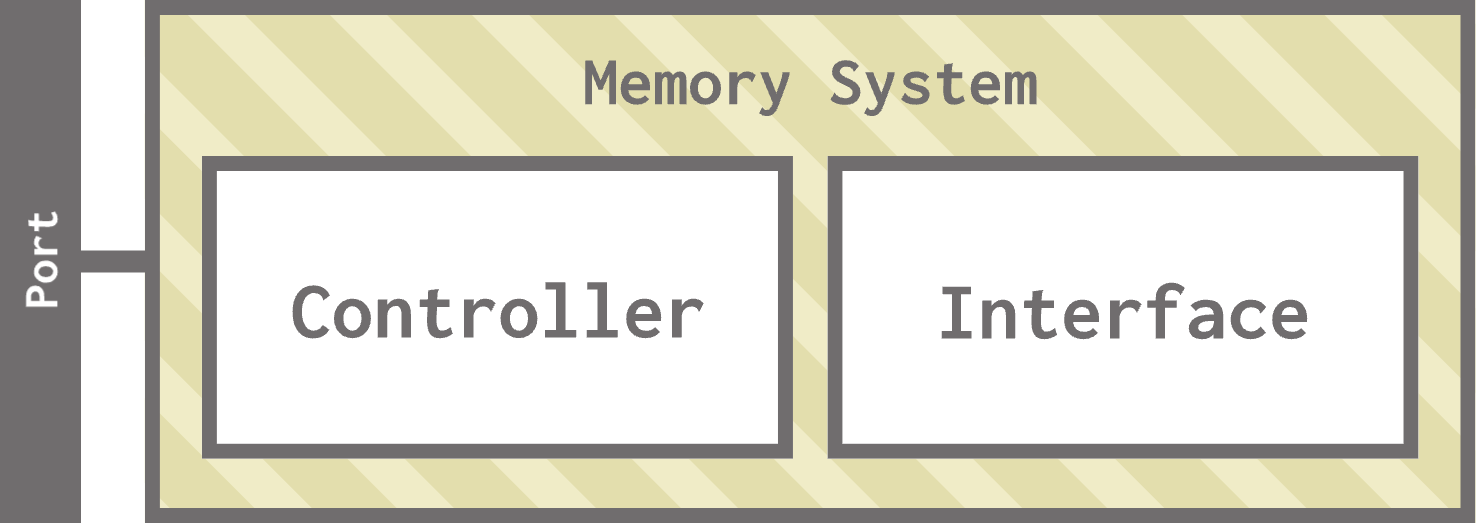
Memory systems in gem5 consist of two main components: memory controllers and memory interfaces.
Memory controllers
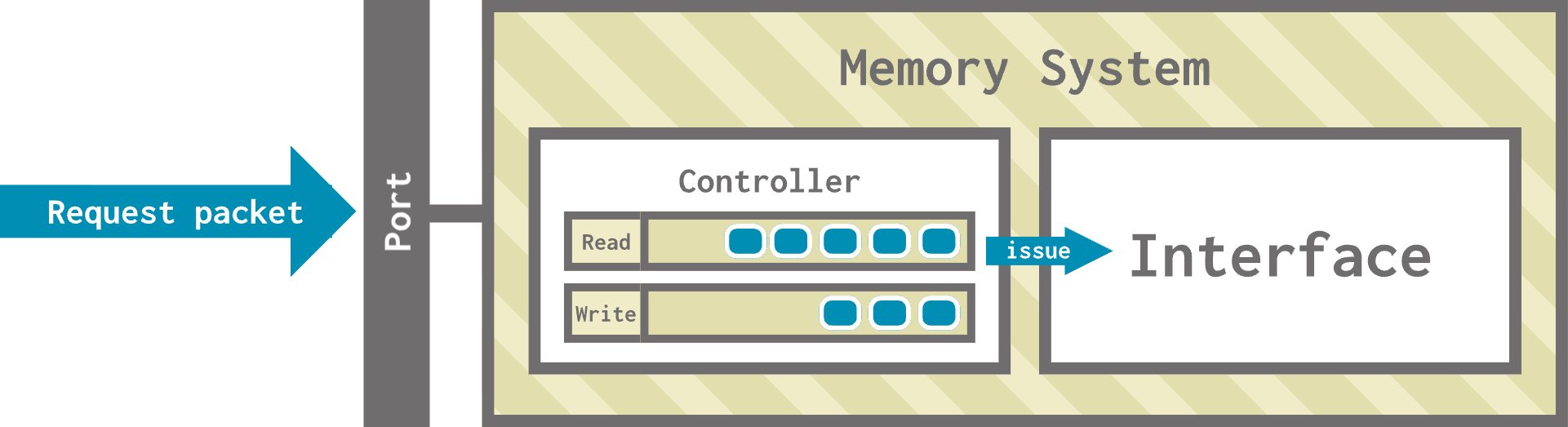
The memory controller’s job is to schedule and issue read and write requests. It receives requests from other systems, queues them into read and/or write queues, and applies a scheduling algorithm to issue them to the interface.
Memory interfaces
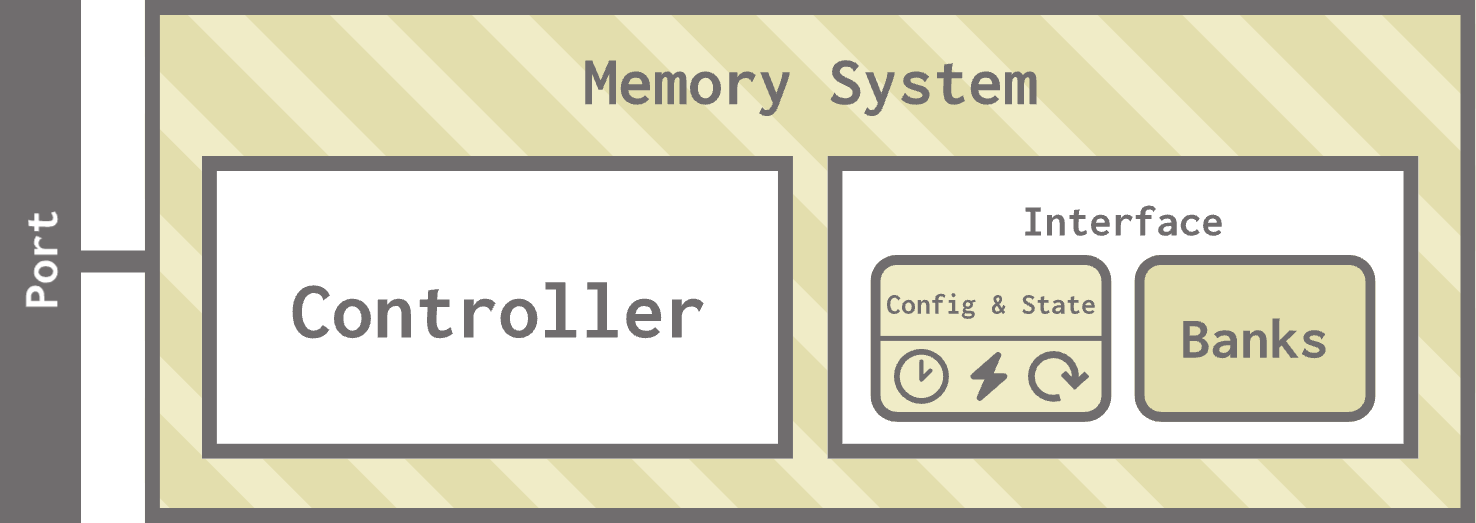
The memory interface implements the architecture and parameters of its memory type (DRAM, HBM, NVM, etc.). It also manages memory activation, pre-charge, low-power modes, and other media-specific operations.
Memory in the standard library
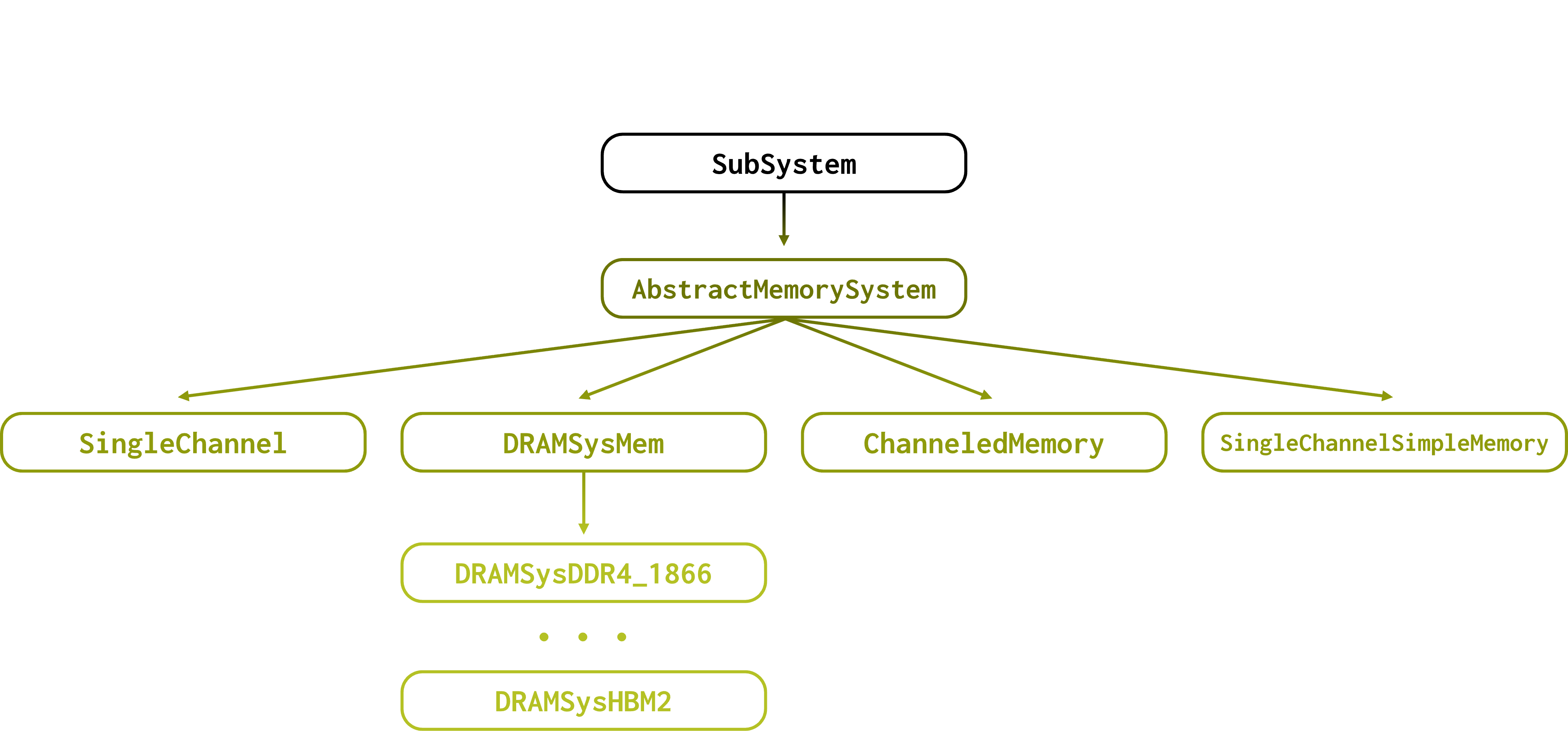
The gem5 standard library contains two kinds of components to model memory: SingleChannelSimpleMemory and ChanneledMemory.
If you’re curious, the class diagram for memory in the standard library is below.
src/python/gem5/components/memory
SingleChannelandDRAMSysMemare used for DRAMSim and DRAMSys, which are other DRAM simulators we won’t discuss in this section.
SingleChannelSimpleMemory
As the name suggests, SingleChannelSimpleMemory is a simpler model that allows you to only specify your desired latency, latency variation, and bandwidth without worrying about the specific memory technology being used.
You can find
SingleChannelSimpleMemoryinsrc/python/gem5/components/memory/simple.py.
Let’s see SingleChannelSimpleMemory in action. Open simple_vs_channeled.py to get started. Currently, this is a simple configuration script running a matrix multiply workload.
Let’s create a SingleChannelSimpleMemory:
from gem5.components.memory.simple import SingleChannelSimpleMemory
memory = SingleChannelSimpleMemory(
    latency = "50ns",
    latency_var = "10ns",
    bandwidth = "32 GiB/s",
    size = "3GiB"
)
This instantiates a 3GiB memory with a latency of 50 nanoseconds (with a variation of 10 nanoseconds) and a bandwidth of 32 GiB per second. You’ll notice that we never specified a memory technology like DDR4.
Let’s run this simulation and see what we get:
gem5 --outdir=simple simple_vs_channeled.py
In stats.txt, you’ll notice statistics from board.memory.module:
board.memory.module.bytesRead::cache_hierarchy.l1dcaches.prefetcher         6912                       # Number of bytes read from this memory (Byte)
board.memory.module.bytesRead::cache_hierarchy.l2cache.prefetcher       112576                       # Number of bytes read from this memory (Byte)
board.memory.module.bytesRead::processor.cores.core.inst        35904                       # Number of bytes read from this memory (Byte)
board.memory.module.bytesRead::processor.cores.core.data        17216                       # Number of bytes read from this memory (Byte)
board.memory.module.bytesRead::total           172608                       # Number of bytes read from this memory (Byte)
board.memory.module.bytesInstRead::processor.cores.core.inst        35904                       # Number of instructions bytes read from this memory (Byte)
board.memory.module.bytesInstRead::total        35904                       # Number of instructions bytes read from this memory (Byte)
board.memory.module.numReads::cache_hierarchy.l1dcaches.prefetcher          108                       # Number of read requests responded to by this memory (Count)
board.memory.module.numReads::cache_hierarchy.l2cache.prefetcher         1759                       # Number of read requests responded to by this memory (Count)
board.memory.module.numReads::processor.cores.core.inst          561                       # Number of read requests responded to by this memory (Count)
board.memory.module.numReads::processor.cores.core.data          269                       # Number of read requests responded to by this memory (Count)
board.memory.module.numReads::total              2697                       # Number of read requests responded to by this memory (Count)
board.memory.module.bwRead::cache_hierarchy.l1dcaches.prefetcher       388243                       # Total read bandwidth from this memory ((Byte/Second))
board.memory.module.bwRead::cache_hierarchy.l2cache.prefetcher      6323331                       # Total read bandwidth from this memory ((Byte/Second))
board.memory.module.bwRead::processor.cores.core.inst      2016708                       # Total read bandwidth from this memory ((Byte/Second))
board.memory.module.bwRead::processor.cores.core.data       967013                       # Total read bandwidth from this memory ((Byte/Second))
board.memory.module.bwRead::total             9695295                       # Total read bandwidth from this memory ((Byte/Second))
board.memory.module.bwInstRead::processor.cores.core.inst      2016708                       # Instruction read bandwidth from this memory ((Byte/Second))
board.memory.module.bwInstRead::total         2016708                       # Instruction read bandwidth from this memory ((Byte/Second))
board.memory.module.bwTotal::cache_hierarchy.l1dcaches.prefetcher       388243                       # Total bandwidth to/from this memory ((Byte/Second))
board.memory.module.bwTotal::cache_hierarchy.l2cache.prefetcher      6323331                       # Total bandwidth to/from this memory ((Byte/Second))
board.memory.module.bwTotal::processor.cores.core.inst      2016708                       # Total bandwidth to/from this memory ((Byte/Second))
board.memory.module.bwTotal::processor.cores.core.data       967013                       # Total bandwidth to/from this memory ((Byte/Second))
board.memory.module.bwTotal::total            9695295                       # Total bandwidth to/from this memory ((Byte/Second))
board.memory.module.power_state.pwrStateResidencyTicks::UNDEFINED  17803273905
These are the statistics collected by SingleChannelSimpleMemory; you’ll notice they track the number of bytes read (instruction and data) by various other components of the system, the bandwidth for those reads, the overall bandwidth, and some power state information.
You don’t need to worry about these statistics in detail for now! We’ll be comparing them to the statistics collected by
ChanneledMemorycomponents.
ChanneledMemory
ChanneledMemory is a component that encompasses the memory controller and the memory interface. It provides an easy way to simulate multiple memory channels by handling things like scheduling and interleaving behind the scenes.
You can find the
ChanneledMemoryclass insrc/python/gem5/components/memory/memory.py.For convenience, the standard library also provides helper functions named in the
NumChannelsDDRX_Frequency()format (for example, theSingleChannelDDR4_2400()function) for generating different memory systems. They can be found insrc/python/gem5/components/memory/single_channel.pyandsrc/python/gem5/components/memory/multi_channel.py. All of these instantiate a correspondingChanneledMemoryinstance by selecting appropriate constructor parameters.
Let’s swap out our SingleChannelSimpleMemory with a ChanneledMemory, specifically a DualChannelDDR4_2400.
from gem5.components.memory.multi_channel import DualChannelDDR4_2400
memory = DualChannelDDR4_2400 (
  size = "3GiB"
)
You’ll notice that this function only takes one parameter (size).
Behind the scenes, this function actually instantiates:
ChanneledMemory(DDR4_2400_8x8, 2, 64, size=size)
Let’s run this again and see what we get!
gem5 --outdir=channeled simple_vs_channeled.py
In stats.txt, you’ll notice a lot more memory-related stats, this time coming from board.memory.mem_ctrl0.dram and board.memory.mem_ctrl1.dram. These are the controllers for the two channels in our memory system!
Here is an (abridged) collection of stats:
[...]
board.memory.mem_ctrl0.avgPriority_processor.cores.core.inst::samples       284.00                       # Average QoS priority value for accepted requests (Count)
[...]
board.memory.mem_ctrl0.priorityMinLatency 0.000000017492                       # per QoS priority minimum request to response latency (Second)
board.memory.mem_ctrl0.priorityMaxLatency 0.000000749520                       # per QoS priority maximum request to response latency (Second)
[...]
board.memory.mem_ctrl0.readReqs                  1352                       # Number of read requests accepted (Count)
board.memory.mem_ctrl0.writeReqs                    0                       # Number of write requests accepted (Count)
[...]
board.memory.mem_ctrl0.readPktSize::6            1352                       # Read request sizes (log2) (Count)
[...]
board.memory.mem_ctrl0.bytesReadWrQ                 0                       # Total number of bytes read from write queue (Byte)
board.memory.mem_ctrl0.bytesReadSys             86528                       # Total read bytes from the system interface side (Byte)
board.memory.mem_ctrl0.bytesWrittenSys              0                       # Total written bytes from the system interface side (Byte)
board.memory.mem_ctrl0.avgRdBWSys        4862477.12829769                       # Average system read bandwidth in Byte/s ((Byte/Second))
board.memory.mem_ctrl0.avgWrBWSys          0.00000000                       # Average system write bandwidth in Byte/s ((Byte/Second))
[...]
board.memory.mem_ctrl0.dram.bytesPerActivate::mean   200.301887                       # Bytes accessed per row activation (Byte)
[...]
board.memory.mem_ctrl0.dram.rank1.actEnergy 576969.120000                       # Energy for activate commands per rank (pJ) (Joule)
board.memory.mem_ctrl0.dram.rank1.preEnergy 1013066.611200                       # Energy for precharge commands per rank (pJ) (Joule)
board.memory.mem_ctrl0.dram.rank1.readEnergy 3063821.980800                       # Energy for read commands per rank (pJ) (Joule)
board.memory.mem_ctrl0.dram.rank1.writeEnergy            0                       # Energy for write commands per rank (pJ) (Joule)
board.memory.mem_ctrl0.dram.rank1.refreshEnergy 1544329930.835928                       # Energy for refresh commands per rank (pJ) (Joule)
[...]
board.memory.mem_ctrl1.dram.rank1.totalEnergy 7668007075.797734                       # Total energy per rank (pJ) (Joule)
board.memory.mem_ctrl1.dram.rank1.averagePower   430.906863                       # Core power per rank (mW) (Watt)
board.memory.mem_ctrl1.dram.rank1.totalIdleTime            0                       # Total Idle time Per DRAM Rank (Tick)
board.memory.mem_ctrl1.dram.rank1.pwrStateTime::IDLE  15637797036                       # Time in different power states (Tick)
board.memory.mem_ctrl1.dram.rank1.pwrStateTime::REF    799750000                       # Time in different power states (Tick)
board.memory.mem_ctrl1.dram.rank1.pwrStateTime::SREF            0                       # Time in different power states (Tick)
board.memory.mem_ctrl1.dram.rank1.pwrStateTime::PRE_PDN            0                       # Time in different power states (Tick)
board.memory.mem_ctrl1.dram.rank1.pwrStateTime::ACT   1357498106                       # Time in different power states (Tick)
board.memory.mem_ctrl1.dram.rank1.pwrStateTime::ACT_PDN            0                       # Time in different power states (Tick)
board.memory.mem_ctrl1.power_state.pwrStateResidencyTicks::UNDEFINED  17795045142                       # Cumulative time (in ticks) in various power states (Tick)
These statistics are much more detailed, providing per-bank information, detailed power modeling statistics, and more.
The goal of looking at these statistics is to compare the level of simulation detail that
SingleChannelSimpleMemoryandChanneledMemoryprovide. Don’t get caught up in the details for now!
When choosing between SingleChannelSimpleMemory and ChanneledMemory, consider the level of simulation detail that your work requires compared to the additional simulation time that ChanneledMemory requires compared to SingleChannelSimpleMemory. Clearly, there’s no objectively correct choice, but there are tradeoffs!
Memory models in gem5
Now that we’ve explored the existing standard library options, let’s look at the memory models available in gem5 and use them to make our own ChanneledMemory component.
Memory Controllers
gem5 has three main memory controllers:
MemCtrl: The main memory controller in gem5. This controller can interact with a DRAM interface or an NVM interface.HeteroMemCtrl: Inherits fromMemCtrland interacts with both a DRAM interface and an NVM interface (making it heterogenous).HBMCtrl: Inherits fromMemCtrland interacts with an HBM interface.
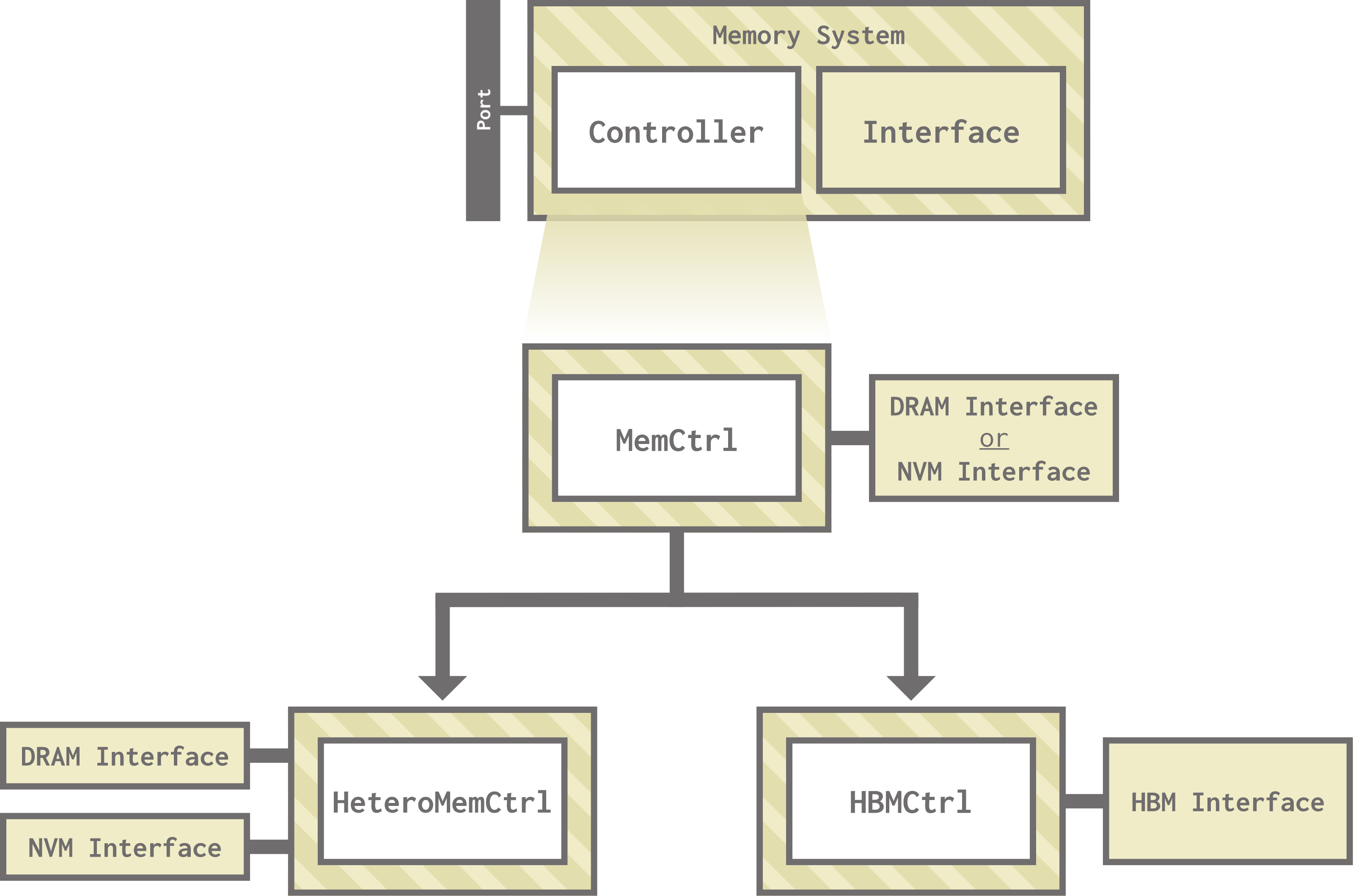
If you’re curious, you can find all three of these models in
src/mem/MemCtrl.py,src/mem/HeteroMemCtrl.py, andsrc/mem/HBMCtrl.py, respectively.
Memory Interfaces
gem5 has two types of memory interfaces, both of which inherit from the MemInterface class:
DRAMInterface: Models all DRAM-based memory interfaces, including DDR (3 and 4), LPDDR (2, 3, and 5), HBM, HMC, and WideIO.NVMInterface: Models the NVM interface.
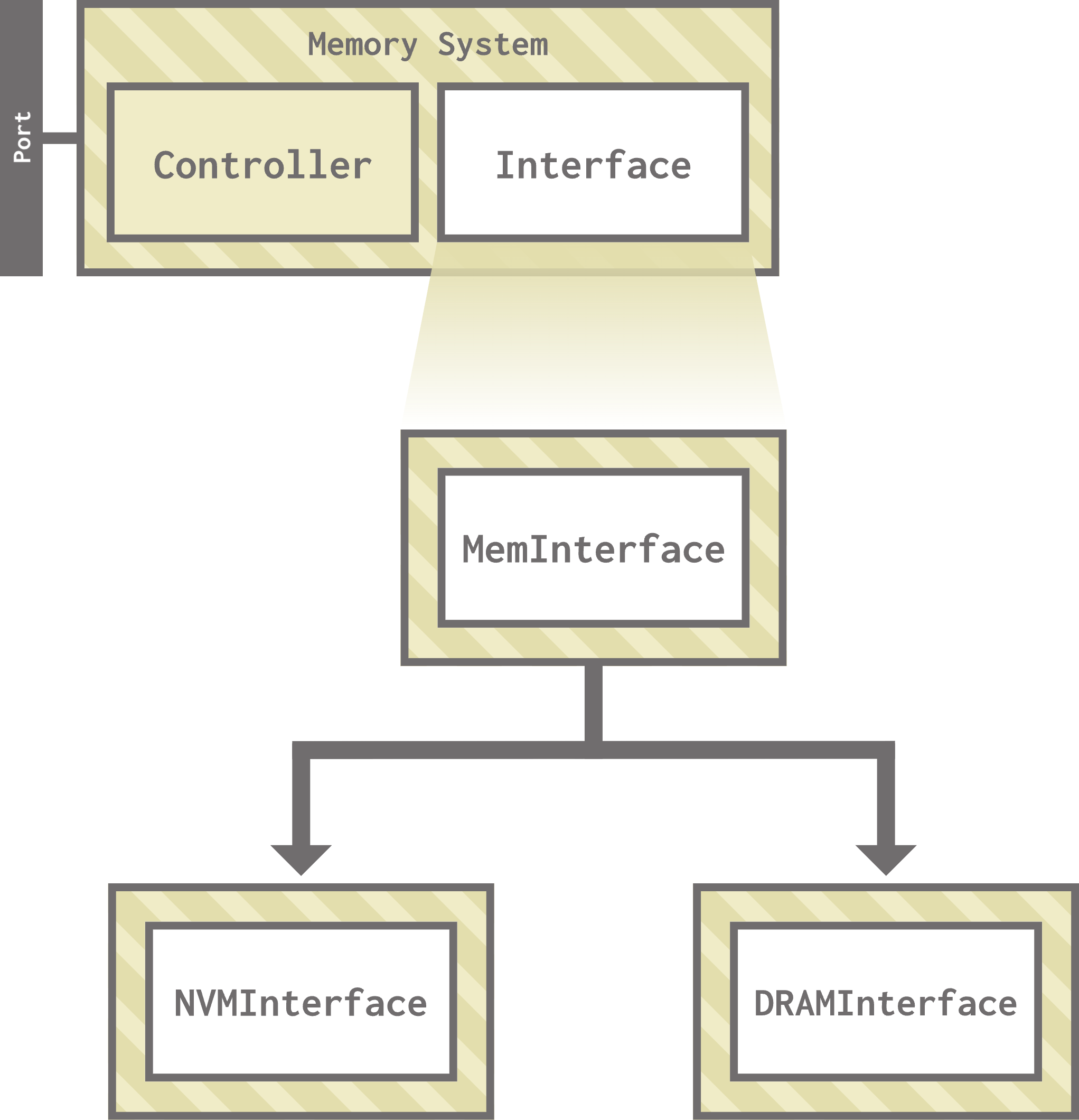
If you’re curious, you can find these two interfaces at
src/mem/DRAMInterfaceandsrc/mem/NVMInterface, respectively.
Creating a custom ChanneledMemory
Let’s put these two pieces together by creating a custom ChanneledMemory representing a single-channel LPDDR2. Open my_lpddr2.py to get started. Currently, this file is basically empty! We’ll be defining a function that creates a ChanneledMemory just like the functions in single_channel.py and multi_channel.py.
First, we should import the memory interface of our choosing, in this case LPDDR2_S4_1066_1x32:
from gem5.components.memory.dram_interfaces.lpddr2 import LPDDR2_S4_1066_1x32
Let’s also import AbstractMemorySystem (the parent class of ChanneledMemory and SimpleSingleChannelMemory) and ChanneledMemory itself:
from gem5.components.memory.abstract_memory_system import AbstractMemorySystem
from gem5.components.memory.memory import ChanneledMemory
Lastly, since we want this function to have an optional size parameter, we need to import Optional:
from typing import Optional
The ChanneledMemory constructor takes the following parameters:
def __init__(
        self,
        dram_interface_class: Type[DRAMInterface],
        num_channels: Union[int, str],
        interleaving_size: Union[int, str],
        size: Optional[str] = None,
        addr_mapping: Optional[str] = None,
    )
We know we want our new memory system to have the LPDDR2 interface we imported and be single-channel. The interleaving size refers to the size of memory requests that will be interleaved between banks, which we’ll set to 64. We’ll expose size as a function parameter and let the other parameters take their default values:
def SingleChannelLPDDR2(
    size: Optional[str] = None,
) -> AbstractMemorySystem:
    return ChanneledMemory(
      dram_interface_class = LPDDR2_S4_1066_1x32, num_channels = 1,
      interleaving_size = 64,
      size=size
    )
…and that’s it! You’ll notice we didn’t explicitly choose a memory controller. ChanneledMemory instantiates a MemCtrl for us, so we don’t need to do it here.
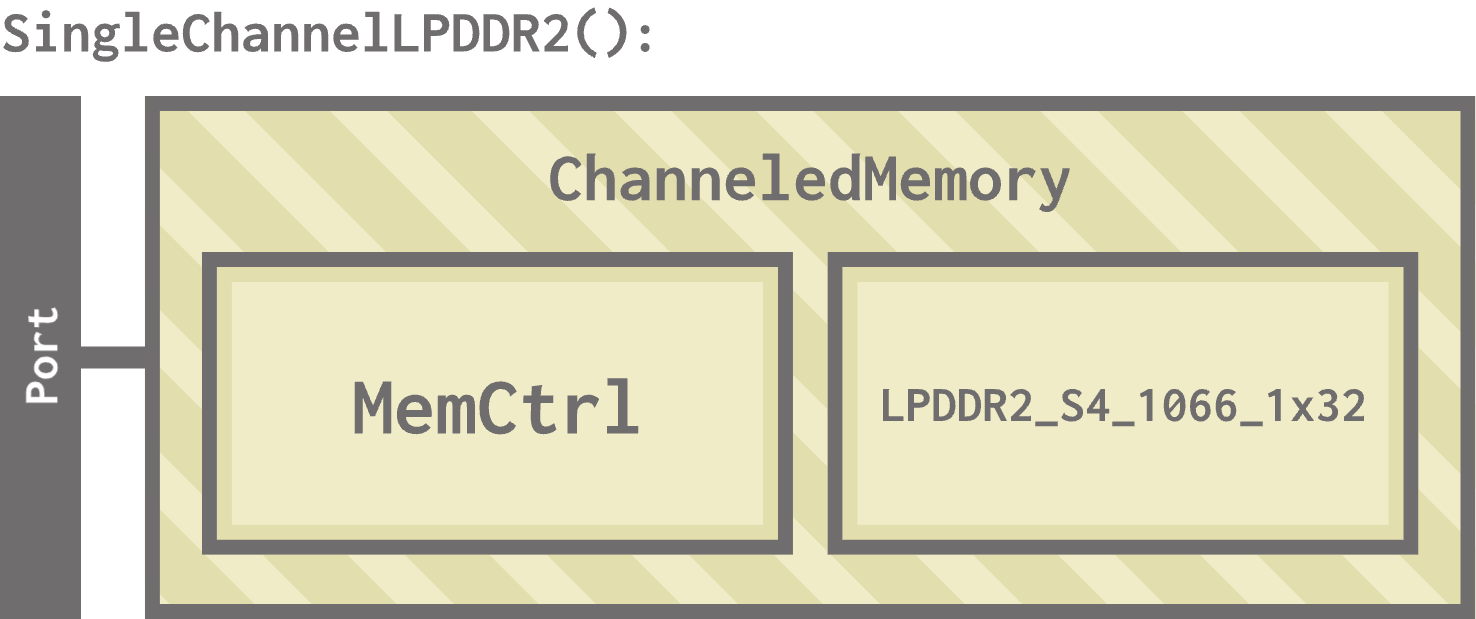
We are now ready to use our custom memory system in our hello world example! Open hello_memory.py to get started. Right now, this file looks exactly how we left it in the last section after adding our custom cache hierarchy. The supporting files required to run the simulation are also provided.
First, we need to import our new memory system. Replace the SingleChannelDDR4_2400 import with:
from my_lpddr2 import SingleChannelLPDDR2
Then, replace the memory instantiation with:
memory = SingleChannelLPDDR2(
    size = "3GiB"
)
We don’t even have to replace the arguments to the function, just the name!
We are now ready to run:
gem5 --outdir=hello_memory hello_memory.py
Let’s take a look at how many reads were made to our memory system. Enter the hello_memory directory and run:
grep 'board.memory.mem_ctrl.dram.numReads' stats.txt
You should see:
board.memory.mem_ctrl.dram.numReads::cache_hierarchy.clusters.l1dcache.prefetcher         8494
board.memory.mem_ctrl.dram.numReads::cache_hierarchy.clusters.l2cache.prefetcher       276020
board.memory.mem_ctrl.dram.numReads::processor.cores.core.mmu.dtb.walker            5
board.memory.mem_ctrl.dram.numReads::processor.cores.core.mmu.itb.walker            4
board.memory.mem_ctrl.dram.numReads::processor.cores.core.inst         2899
board.memory.mem_ctrl.dram.numReads::processor.cores.core.data        11898
board.memory.mem_ctrl.dram.numReads::total       299320
You’ll notice these are organized by source then summed up for a total of 299320 read requests that made it to DRAM.
As we saw before, there are a lot of other stats to explore here!
We’ve now officially replaced every standard library component in our hello world example with a custom made component! Only the workload remains: we’ll discuss how to customize that in the next unit.